

I deployed a schema change to 30 servers using my deploy-at-low-priority script via SSMS multi-server query. Some of these servers were small with almost no activity, so I expected them to finish within seconds. I opened another multi-server connection to check on progress and none of the small servers showed any sign of having completed. Then all 30 finished at the same time.
What is multi-server query
If you haven't used it before: SSMS lets you register servers into groups (View > Registered Servers), then right-click a group and choose "New Query". That opens a single query window connected to all servers in the group at once. You write one script, execute it, and SSMS runs it against every server. Results come back in a combined grid with a server name column so you can tell which row came from where.
It's great for checking configurations, running health checks, or deploying changes across multiple servers without a loop. Or so I thought.
The worry
My first thought was transaction scope. If multi-server query wraps everything in some distributed transaction, a slowdown on one server could hold locks on all others. That would turn my "deploy at low priority" script into "deal with an incident at high priority".
What GO actually does
Quick reminder: GO is not a SQL command. It's a client directive that tells SSMS where to split the script into batches. SSMS parses at GO boundaries, sends one batch, waits for results, sends the next.
The question is how this behaves with multiple connections open at once.
Testing it
I opened a multi-server query against the same server (four connections via a registered server group) and set up a simple experiment:
- Batch 1 records a start timestamp, waits for a different delay per connection (based on
@@SPID % 4), then records an end timestamp GOseparates the batches- Batch 2 just records when it starts
If the connections are independent, each one starts batch 2 right after its own delay. If there's synchronization, they all start batch 2 at the same time, after the slowest delay.
-- Batch 1: introduce a different delay per connection
DECLARE @delay INT = CASE
    WHEN @@SPID % 4 = 0 THEN 0
    WHEN @@SPID % 4 = 1 THEN 5
    WHEN @@SPID % 4 = 2 THEN 12
    ELSE 20
END;
DECLARE @d VARCHAR(8) = '00:00:' + RIGHT('0' + CAST(@delay AS VARCHAR(2)), 2);

SELECT
    @@SPID AS SPID
   ,SYSDATETIMEOFFSET() AS Batch1_Start
   ,@delay AS DelaySeconds;

WAITFOR DELAY @d;

SELECT
    @@SPID AS SPID
   ,SYSDATETIMEOFFSET() AS Batch1_End;
GO

-- Batch 2: record when this connection starts
SELECT
    @@SPID AS SPID
   ,SYSDATETIMEOFFSET() AS Batch2_Start;
GO
The results
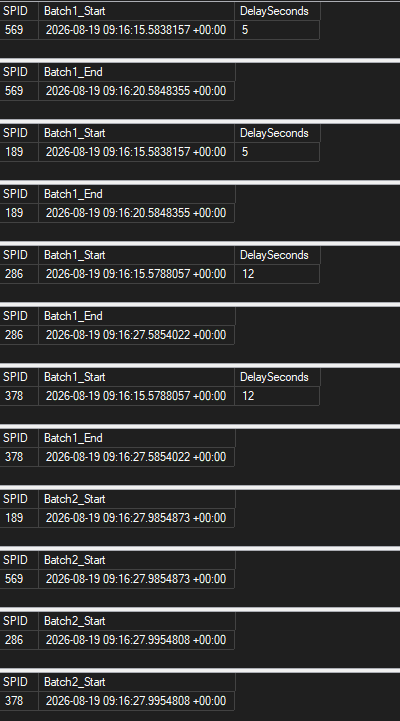
What to look for:
- Four different SPIDs prove these are separate connections, even though they hit the same server
- Each SPID appears in both batches, proving the connection persists across
GO - All
Batch2_Starttimestamps land within milliseconds of each other, regardless of delay
The fast connections sat idle, waiting for the slowest one to finish. Since SSMS hasn't sent the next batch yet, there's no active request on the server. You won't find this wait in sys.dm_exec_requests or any other DMV because it's entirely client-side.
What the code says
I used ILSpy (with Claude's help navigating the decompiled C#) to trace the execution path in Microsoft.SqlServer.Management.MultiServerConnection.dll from SSMS 20.2. MultiServerSqlCommand.ExecuteReader dispatches each batch to all connections in parallel and returns a combined MultiServerSqlDataReader that tracks which connections are waiting, ready, failed, or completed. The SSMS editor won't submit the next batch to any connection until the current batch has settled across all of them.
GO is a client-side synchronization barrier. SSMS refuses to send batch N+1 until batch N is done on every connection.
The good news: there's no group transaction. MultiServerSqlCommand's transaction members currently throw NotImplementedException. Each server's transaction is entirely local. So my distributed locking worry was unfounded.
Why this made my deployment unpredictable
The deploy-at-low-priority script runs a tight loop checking sys.dm_tran_locks every 200ms, looking for a moment with zero SCH-S locks on the target object. That moment might last milliseconds. When the loop finds it, it jumps to gotta_go_fast: and hits GO, which triggers the deploy batch.
What I expected
- Server A finds a gap at T=2s, deploys immediately
- Server B at T=3s, deploys immediately
- Server C (the busy one) at T=8s, deploys immediately
What actually happened
All 30 servers ran the lock-checking loop (batch 1). The small idle servers found their gap almost immediately, but SSMS held all 30 connections at the GO boundary until the last server's loop exited. The large busy servers kept looping for minutes while the small ones sat there doing nothing.
By the time the deploy batch fired on all 30 servers simultaneously, the lock-free windows that the small servers originally found were long gone. Maybe a new window happened to be open at that exact moment, maybe not. The deploy didn't necessarily fail, but the whole point of the lock-checking loop was to fire at precisely the right moment. The GO barrier threw that precision away.
What doesn't break
This only matters when the lock-checking loop and the deploy are in separate batches separated by GO. If your deploy fits in a single batch, there's no barrier. But the deploy-at-low-priority script needs the GO between the lock-check loop and the ALTER because the ALTER must be in its own batch (that's the whole reason for the GOTO trick in the first place).
The fix: deploy per server
The workaround is to not use multi-server query for lock-sensitive deployments. Run each server independently so the lock-check loop fires at the right moment for that server.
$servers = Get-Content .\servers.txt

foreach ($server in $servers) {
    Write-Host "Deploying to $server..."
    try {
        Invoke-DbaQuery -SqlInstance $server `
            -File .\deploy-at-low-priority.sql `
            -EnableException
        Write-Host "  Done." -ForegroundColor Green
    }
    catch {
        Write-Host "  FAILED: $_" -ForegroundColor Red
        break
    }
}
Serial is the simplest option. You see each result before moving on. You can go parallel with ForEach-Object -Parallel or Start-Job, but that takes a bit more work to handle errors and reporting.
Invoke-DbaQuery is from the dbatools module. -EnableException makes it throw on errors instead of writing warnings, so the catch block actually fires.
Multi-server query is still great for read-only checks, monitoring, and configuration changes. Just not for scripts that depend on finding a lock-free window across a GO boundary.
The monitoring blind spot
Because the GO barrier wait is client-side, SQL Server knows nothing about it. No wait stats. No blocked process report. No Extended Events. If someone asks "why did the deployment take 40 minutes?", you can check every DMV on every server and find nothing. The delay happened in SSMS on the admin's workstation. The servers were idle, waiting for a batch that hadn't been sent yet.
Final thoughts
GO in multi-server mode is a synchronization barrier. The wait is entirely client-side, invisible to SQL Server monitoring, and it has nothing to do with transactions. If your script relies on timing precision across a GO boundary, multi-server query will break it. Use any orchestration that runs connections independently (PowerShell, dbatools, your CI/CD pipeline) for lock-sensitive deployments. Keep multi-server query for the stuff it's good at: monitoring, configuration, anything where "wait for the slowest" doesn't matter.
Thank you for reading