
Another KDA case. Digitown's utility bills suddenly doubled for no good reason. With the election coming up, I got pulled in to figure out what went wrong. I’ve got the billing data and the SQL they used - now it’s time to dig in.
The problem
Imagine this: It's a fresh new year, and citizens of Digitown are in an uproar. Their water and electricity bills have inexplicably doubled, despite no changes in their consumption.
Sounds less like a billing error and more like Digitown accidentally subscribed to a corporate pricing model.
They also mention:
The city's billing system utilizes SQL (an interesting choice, to say the least), but fret not, for we have the exported April billing data at your disposal. Additionally, we've secured the SQL query used to calculate the overall tax. Your mission is to work your magic with this data and query, bringing us closer to the truth behind this puzzling situation.
SELECT SUM(Consumed * Cost) AS TotalCost
FROM Costs
JOIN Consumption ON Costs.MeterType = Consumption.MeterType
And the main question to answer is:
What is the total bills amount due in April?
Solution
The SQL code is just there to highlight the EXPLAIN functionality, which translates SQL code to KQL.
EXPLAIN
SELECT SUM(Consumed * Cost) AS TotalCost
FROM Costs
JOIN Consumption ON Costs.MeterType = Consumption.MeterType
gives
Costs
| join kind=inner
(Consumption
| project-rename ['Consumption.MeterType']=MeterType)
  on ($left.MeterType == $right.['Consumption.MeterType'])
| summarize TotalCost=sum(__sql_multiply(Consumed, Cost))
| project TotalCost
EXPLAIN translates SQL into its KQL equivalent. Handy as a starting point when you know the SQL logic but not the KQL syntax - though the output usually benefits from cleanup.
But the query is simple enough we can do without it.
Let's start by inspecting the data. The ingestion created two tables: Consumption (actual usage) and Costs (lookup table)
Consumption
| take 50
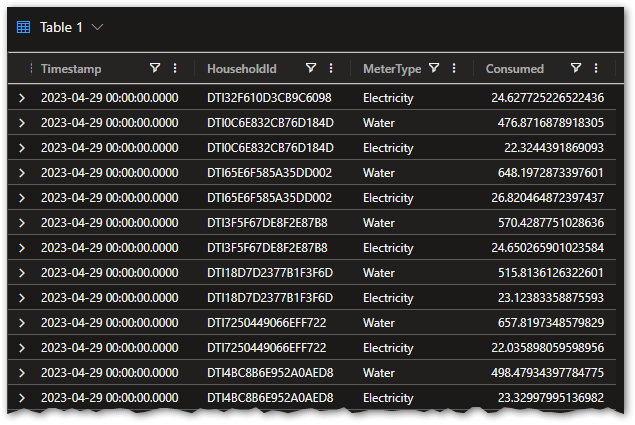
The data covers all of April 2023:
Consumption
| summarize min(Timestamp), max(Timestamp)
where Timestamp between(...) dramatically reduces scan cost. We'll add time filters throughout this series to build the habit.
We can take a look at a random household:
Consumption
| where HouseholdId == "DTI3F5F67DE8F2E87B8"
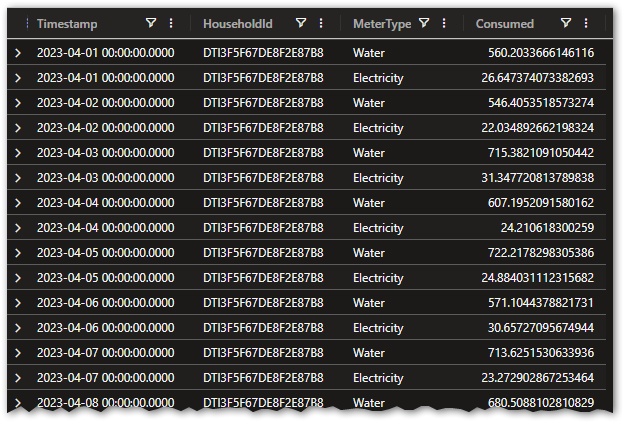
Looks like there is a single Water and Electricity consumption per household per day.
Let's test that hypothesis:
Consumption
| where Timestamp >= datetime(2023-04-01) and Timestamp < datetime(2023-05-01)
| summarize count() by HouseholdId, bin(Timestamp, 1d)
| where count_ > 2
| take 10

Taking a closer look at one of the overcharged households and time periods:
Consumption
| where HouseholdId == "DTI755365C722DAEA93"
| where bin(Timestamp, 1d) == datetime(2023-04-29 00:00:00.0000)
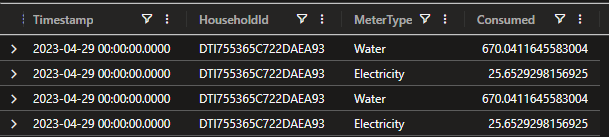
We can see some duplicate data. But wait - there’s more:
Consumption
| where Timestamp >= datetime(2023-04-01) and Timestamp < datetime(2023-05-01)
| where Consumed < 0
| take 10
This shows there are some rows where consumption is negative.
We need to filter out bad data and join with the Costs table to get the final result.
distinct * removes exact duplicate rows - every column must match. If the duplicates differ by even one field (a slightly different timestamp, for instance), this approach won't catch them.
The final query:
Consumption
| where Timestamp >= datetime(2023-04-01) and Timestamp < datetime(2023-05-01)
| where Consumed > 0 // filter out negative consumption
| distinct * // remove duplicate lines
| summarize sum(Consumed) by MeterType
| lookup kind=inner Costs on MeterType
| summarize sum(Cost * sum_Consumed)
Two problems in the data: duplicate consumption records inflating every bill, and negative entries pulling the total the wrong way. Filter the negatives, dedup the rest, join with the cost table - case closed.
Thank you for reading